Cart-page cross-sells have a timing problem. They show up after the customer has already picked a product, opened the cart, and moved a step closer to checkout. That is better than nothing, but it is not always where attention is strongest.
On the product page, the customer is still making up their mind. They are checking variants, scanning benefits, comparing prices, and deciding whether the item solves the problem they came to solve. That is exactly why product-page cross-sells can work so well in WooCommerce. The offer appears while the buying decision is still open, not after it has mostly hardened.
That is the real reason people search for product page cross sell woocommerce or woocommerce cross sell on product page. They do not just want recommendations somewhere on the site. They want them in a place where customers can still act on them naturally.
In this guide, we will look at why product-page cross-sells often outperform cart-only setups, how to implement them without turning merchandising into a manual chore, and what to look for in a plugin that handles the placement well. If you want a working reference while you read, this WooCommerce cross-sell plugin shows the general approach clearly.
Why cross-sells on the product page work better than cart-only suggestions
The short version is simple: context is stronger earlier.
When a shopper is on a product page, they still care about fit. They are deciding whether to buy a camera, which lens option to choose, whether they need a case, and whether an accessory is worth adding now instead of later. A relevant suggestion in that moment can feel like help.
By the time the shopper reaches the cart, the emotional posture is different. The job is no longer “build the right purchase.” It is “finish the checkout without distractions.” That is why some cart-page cross-sells underperform. They are not always bad offers. They are just late offers.
This matters even more for stores that sell obvious complements:
- phone and case
- coffee machine and descaler
- yoga mat and carrying strap
- dog harness and leash
- skincare serum and applicator
On the product page, those combinations make immediate sense. In the cart, they can feel like an interruption.
That does not mean cart or drawer placements have no value. It means product-page placement deserves more attention than default WooCommerce usually gives it.
What default WooCommerce does not handle well here
WooCommerce gives store owners the raw idea of cross-sells, but not the most flexible implementation for product-page merchandising.
The first issue is that native cross-sells are better known for cart use than for strong on-page presentation. If your goal is to show a clear add-on before the Add to Cart decision, you usually end up looking for something more intentional.
The second issue is admin overhead. Even if you know exactly which products should be paired, editing them one by one is tedious. It is especially tedious when the pairing logic is broader than a single SKU and really belongs to a category or tag.
The third issue is message quality. Product-page cross-sells need more than a relationship in the database. They need presentation. Why this item? Why now? Is there a discount? Is there a short CTA that makes the match obvious? Native setups tend to leave too much of that value on the table.
If your broader question is whether you need a plugin at all, the pillar guide on the best WooCommerce cross-sell plugin walks through the decision from a wider angle.
What to look for in a WooCommerce product-page cross-sell setup
If you want this placement to do real work, a few details matter more than the rest.
Placement above the Add to Cart button
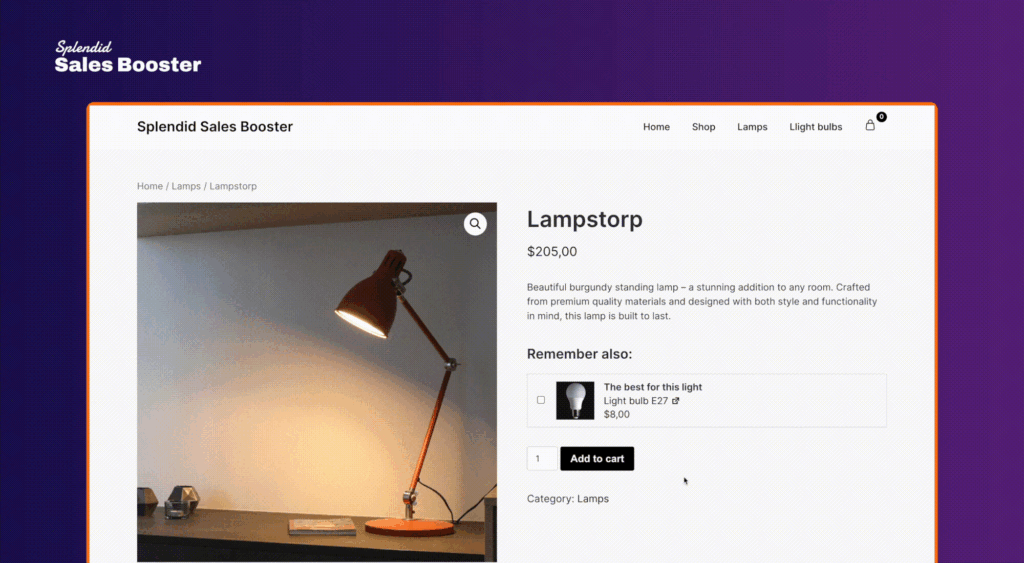
This is the key behavioral detail. A product-page cross-sell works best when it appears in the decision zone, not buried far below the fold where it feels like generic related content.
Splendid Sales Booster supports product-page placement above the Add to Cart button. That is useful because it keeps the offer tied to the buying action itself. The customer can evaluate the main product and the add-on in one tight moment.

Bulk setup instead of one-product-at-a-time editing
Some stores need curated product-level matches. Plenty do not. If every product in a category should promote the same complementary item or set of items, your plugin should let you do that in bulk.
This is where rule-based setup matters. Category rules, tag rules, and all-products rules are much more practical than repeating the same pairing across dozens of product pages.
If scaling this process is your main challenge, the next article to read is how to set up WooCommerce cross-sells in bulk by category or tag.
CTA copy that explains the offer
A plain recommendation block can work, but product-page placement benefits from specificity. If the plugin lets you customize CTA subtitles or supporting copy, you can explain the match in a way that reduces hesitation.
“Protect your phone from day one” is stronger than a generic suggestion. “Add lens cleaner for the first month of use” is stronger than a silent product card.
Discount flexibility when it makes sense
Not every add-on needs a discount, and forcing one can cheapen the offer. Still, many stores get better uptake when the extra product includes a visible percentage or fixed-amount discount.
The practical requirement is choice. A useful plugin should support no discount, percentage discount, or fixed-amount discount so the merchandising logic can fit the product.
Compatibility with your actual catalog
It sounds obvious, but it gets missed often. If your catalog includes variable products, subscriptions, or variable subscriptions, you want a plugin that supports those product types in the main flow instead of treating them like awkward exceptions.
Product-page cross-sells vs related products
These two things get blended together all the time, but they are not the same.
Related products are often loose associations. They may be algorithmic, generic, or simply based on shared categories or tags. They help discovery, but they do not always create a strong commercial suggestion.
Product-page cross-sells are more deliberate. They answer a narrower question: what else should this customer consider adding right now because it complements the item they are already evaluating?
That difference changes the design of the offer. Cross-sells benefit from:
- tighter relevance
- clearer messaging
- more prominent placement
- optional discount logic
- a stronger CTA
If you want a broader comparison of those overlapping terms, this planned piece on WooCommerce related products, cross-sells, and frequently bought together is where the terminology gets sorted out properly.
A practical implementation model
The most workable setup for many stores is not “pick one placement and hope.” It is a layered model.
Start with product-page cross-sells for the items that benefit from early context. Accessories, refills, care products, warranties, bundles, and compatible add-ons all fit naturally here.
Then, if useful, combine that with a post-add-to-cart drawer for customers who need a second prompt after committing to the main item. Documentation for Splendid Sales Booster supports both modes at the same time, which is useful because the product page and the drawer do different jobs.
The product page explains. The drawer catches momentum.
That is also why product-page placement often outperforms a cart-only strategy. It does not try to rescue attention at the last minute. It participates in the actual purchase decision.
Try the product-page logic in context
The easiest way to judge this setup is not by reading another paragraph. It is by interacting with the offer and seeing whether the cross-sell appears like a natural part of the buying flow.
Use the module below and test the behavior as if you were a shopper. Add the product to cart and watch how the offer is presented in context.
Click the button to add a sample product to your cart and watch our cross-sell drawer spring to life — no strings attached.
Once you have tried the front-end behavior, the next useful step is to inspect how quickly you can configure a similar setup from the store side.
When product-page cross-sells make the biggest difference
This placement is especially effective when the add-on improves the main purchase immediately.
Think of a customer buying a coffee machine. A descaling product, cleaning tablets, or a milk frothing accessory make sense before checkout because they complete the use case. The same goes for a laptop sleeve on a laptop page, a spare blade on a grooming device page, or a refill pack on a subscription landing product.
Product-page cross-sells also help when the complementary purchase needs a tiny bit of explanation. Cart-page suggestions often do not get enough cognitive room. A product-page offer can be framed more clearly through placement, CTA copy, and discount context.
Where stores usually struggle is consistency. The idea works, but maintaining it manually across many products becomes a chore. That is why the setup method matters as much as the placement itself.
How to choose the right plugin for this use case
If your main goal is to show WooCommerce cross-sells on the product page, the plugin should be evaluated with that exact use case in mind.
Look for a setup that gives you:
- product-page placement above the Add to Cart button
- category or tag rules for bulk rollout
- optional discounts
- custom CTA text or subtitles
- product-level overrides when needed
- the option to pair product-page placement with a post-add-to-cart drawer
Avoid tools that technically support recommendations but force you back into manual editing for every meaningful change. That usually means the plugin solves the display problem but not the operations problem.
If you want to test a setup that covers both, open the live demo. It is a fast way to see how product-page and post-add-to-cart cross-sells can fit together in WooCommerce. You can also review the main product page for the WooCommerce cross-sell plugin if you want the broader feature overview first.
Conclusion
Showing WooCommerce cross-sells on the product page is usually less about adding another block and more about fixing timing.
When the offer appears before the customer has mentally finished the purchase, it has a better chance of feeling relevant, useful, and easy to accept. That is why product-page cross-sells often outperform cart-only setups, especially for stores with clear complementary products.
The strongest implementation is usually the one that combines good placement with low-maintenance setup. If you can manage offers in bulk, adjust the message, and test the behavior quickly, you are in a much better position than with default manual cross-sells alone.
The practical next step is simple: try the shortcode interaction above, then open the live demo and see how quickly you can build a product-page cross-sell flow that actually fits your store.